Stitch Brushes, Actions & Styles Set
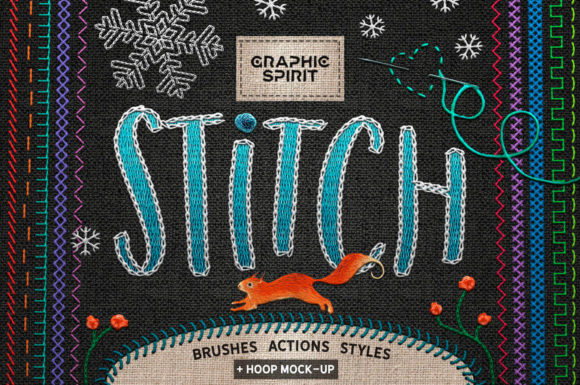
There is a distinct warmth to handcrafted design that digital perfection often struggles to replicate. The slight irregularity of a thread, the texture of woven fabric, and the tactile depth of an embroidered seam evoke nostalgia and authenticity. For modern designers, replicating this organic feel manually can be time-consuming and technically demanding. This is where the Stitch Brushes, Actions, Styles Set becomes an indispensable asset in your creative toolkit. It bridges the gap between digital efficiency and artisanal charm, allowing you to infuse your projects with the cozy, grounded aesthetic of embroidery without needing a needle and thread.
This comprehensive collection is not merely a set of brushes; it is a holistic system designed to transform flat graphics into textured, three-dimensional compositions. By combining specialized brushes, automated actions, and realistic layer styles, you can turn any text or graphic element into a hand-stitched masterpiece. Whether you are designing branding materials, social media content, or print-on-demand products, this toolkit provides the consistency and realism required to make your digital work feel tangible.
The Power of Integrated Design Tools
One of the most significant challenges in digital embroidery simulation is maintaining consistency across different elements. Using disparate brushes and manual shading techniques often results in a disjointed look. The Stitch Brushes, Actions, Styles Set solves this by offering a unified ecosystem. Every component, from the brush tips to the layer effects, is calibrated to work harmoniously at 300 dpi, ensuring print-ready quality.
The inclusion of Auto Stitch Around Layer Actions is particularly transformative for workflow efficiency. Instead of manually painting every stitch along the edge of a complex shape, these actions automate the process, creating a uniform border that mimics real sewing techniques. This feature alone saves hours of meticulous work, allowing designers to focus on composition and concept rather than repetitive technical tasks. When paired with the included layer styles, which add realistic embossing and texture, the result is an instant, professional-grade effect that holds up under close inspection.
Exploring the Versatility of Stitch Types
A key strength of this toolkit lies in its diverse array of brush types, each mimicking specific traditional embroidery techniques. Understanding when and how to use these variations can significantly elevate your design narrative.
- Simple and Zigzag Stitches: Ideal for clean, modern borders or highlighting specific design elements. The zigzag variant adds a playful, dynamic energy suitable for youth-oriented brands or casual apparel designs.
- Cross and Blanket Stitches: These evoke a rustic, folk-art aesthetic. They are perfect for holiday-themed designs, cottage-core branding, or packaging that aims to convey homemade quality.
- Chain and Ladder Stitches: Offering a more decorative and intricate look, these brushes work well for framing quotes or adding delicate details to illustrations.
- Specialty Stitches: The inclusion of unique options like Baseball, Fortress Wall, Snowflake, and Colonial Knot stitches allows for highly specific thematic applications. For instance, the Baseball stitch is invaluable for sports-related merchandise, while the Snowflake stitch offers immediate seasonal relevance for winter campaigns.
By mixing and matching these styles, you can create layered, complex textures that mimic the depth of actual fabric art. The ability to switch between a rugged blanket stitch and a refined chain stitch within the same project gives you the flexibility to adapt the tone of your design from casual to elegant seamlessly.
Practical Applications for Creators and Businesses
The utility of the Stitch Brushes, Actions, Styles Set extends across various industries and creative disciplines. Here is how different users can leverage this toolkit to meet their specific goals.
For Brand Designers and Marketers
In an era of sleek, minimalist digital interfaces, brands are increasingly seeking ways to stand out through warmth and authenticity. Using embroidery-style textures in logos, packaging, or social media graphics can humanize a brand. Imagine a coffee shop’s loyalty card featuring a stitched logo, or a skincare brand using linen textures and subtle stitching to emphasize natural ingredients. The 11 Linen Texture Preset Colors included in the layer styles allow you to match these effects precisely to your brand’s color palette, ensuring cohesive visual identity.
For Print-on-Demand Entrepreneurs
Selling custom apparel and home decor is a competitive market. Designs that look like high-quality embroidery often command higher perceived value. With this toolkit, you can create mockups that showcase t-shirts, tote bags, or patches with realistic stitching effects. The included Hoop Mock-Ups (both Round and Oval) are particularly valuable here. They allow you to present your designs in a context that customers instantly recognize and appreciate, increasing conversion rates by helping buyers visualize the final product.
For Educators and Hobbyists
Teachers creating classroom materials or hobbyists designing personal projects can use these tools to add a friendly, approachable feel to their work. Worksheets, invitations, and scrapbook pages benefit from the soft, handmade look of stitched borders. The ease of use means that even those with limited Photoshop experience can achieve professional results, thanks to the pre-configured actions and styles.
Achieving Realism and Consistency
To get the most out of the Stitch Brushes, Actions, Styles Set, it is essential to understand the importance of resolution and texture. All assets are optimized for 300 dpi, which is the standard for high-quality printing. Working at this resolution ensures that the individual threads and fabric weaves remain crisp and detailed, avoiding the pixelation that can ruin the illusion of realism.
When applying these effects, consider the lighting and direction of your "stitches." The 2 Stitch Emboss Layer Styles and 4 Embroidery Texture Layer Styles provide depth, but they should be used in conjunction with your document’s overall lighting scheme. If your design features a light source from the top left, ensure your emboss settings reflect that direction to maintain physical plausibility. Additionally, utilizing the Colonial Knot and Snowflake brushes as accent points can break up monotony in larger stitched areas, adding visual interest and complexity.
Organization is also key. Since the toolkit includes numerous brushes and styles, naming your layers clearly and grouping them logically will save time during revisions. Use the actions to generate the base stitch outlines, then refine with manual brush strokes where necessary to add imperfections that enhance the handmade feel. Real embroidery is rarely perfectly uniform; introducing slight variations in spacing or tension can make your digital design feel more authentic.
Elevating Your Presentation with Mockups
A design is only as compelling as its presentation. The bonus Hoop Mock-Ups included in this set provide an excellent way to showcase your creations. Placing your stitched design within a wooden embroidery hoop creates an immediate association with craft and quality. This is particularly effective for portfolio pieces, Etsy listings, or Instagram posts. The round and oval options offer versatility, allowing you to choose the frame that best complements your composition’s aspect ratio.
When using these mockups, pay attention to the background environment. A neutral, textured background often works best to let the stitching details shine. Ensure that the shadows and highlights in the mockup align with your design’s lighting to maintain the illusion of depth. This attention to detail transforms a simple graphic into a lifestyle image that resonates with viewers on an emotional level.
Technical Requirements and Compatibility
To utilize this toolkit effectively, you will need Adobe Photoshop CS6 or above. The actions and layer styles are built to leverage the capabilities of these versions, ensuring smooth performance and compatibility. While newer versions of Photoshop may offer additional features, the core functionality of the Stitch Brushes, Actions, Styles Set remains robust and reliable across all supported platforms. Always ensure your workspace is set to the correct color profile (typically CMYK for print or sRGB for web) before beginning your project to guarantee accurate color reproduction.
In conclusion, this toolkit is more than a collection of digital assets; it is a gateway to a richer, more tactile design language. By integrating these stitches, styles, and actions into your workflow, you can create work that stands out in a crowded digital landscape, offering viewers a sense of comfort, craftsmanship, and genuine connection.