Mastering Fluid Art with Procreate Alcohol Ink Brushes
Digital art has evolved significantly, moving beyond rigid lines and solid fills to embrace texture, fluidity, and organic movement. For artists who love the unpredictable beauty of traditional alcohol ink but want the convenience and undo button of digital creation, Procreate Alcohol Ink Brushes offer a transformative solution. These tools bridge the gap between physical media and digital flexibility, allowing creators to produce stunning, ethereal pieces without the mess, cost, or ventilation requirements of real-world supplies.
Whether you are a seasoned illustrator looking to expand your toolkit or a beginner eager to explore abstract expressionism, understanding how to leverage these specialized brushes can elevate your workflow. This guide explores how these digital assets function, the specific challenges they solve, and practical strategies for integrating them into your creative process on the iPad.
Why Choose Digital Alcohol Ink?
Traditional alcohol ink art is celebrated for its vibrant colors and spontaneous flows. However, it comes with significant barriers. The materials are expensive, the fumes require proper ventilation, and once the ink hits the paper, mistakes are nearly impossible to correct. Many artists find themselves hesitant to experiment due to the fear of ruining costly Yupo paper or wasting premium inks.
Procreate Alcohol Ink Brushes address these pain points directly. They replicate the visual characteristics of bleeding, blending, and pooling ink while offering the safety net of digital editing. You can experiment with bold color combinations, resize elements, and adjust opacity without any financial risk. This freedom encourages experimentation, which is crucial for developing a unique artistic style. Furthermore, the ability to layer digital textures means you can achieve complex depths that might be difficult to control physically.
Understanding the Brush Pack Composition
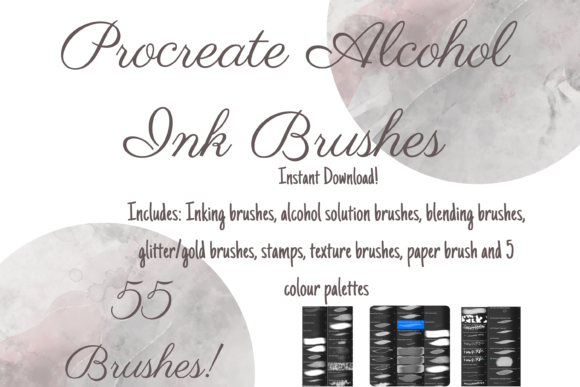
To get the most out of your digital toolkit, it is essential to understand what is included in a comprehensive brush set. A high-quality pack of Procreate Alcohol Ink Brushes typically includes a diverse range of tools designed to mimic various stages of the alcohol ink process. For instance, a robust collection might feature 55 unique individual digital brushes, categorized to serve specific functions within your artwork.
- Ink Brushes: With around 27 distinct ink brushes, you have access to a variety of flow rates and edge definitions. Some may mimic sharp, crisp drops, while others simulate soft, diffused blooms.
- Blender Solutions: Real alcohol ink art relies heavily on blending solutions to move pigment around. Digital equivalents, such as the 8 specific blender solution brushes found in premium packs, allow you to push, pull, and mix colors seamlessly on the canvas.
- Wash and Background Tools: Creating a cohesive background is often the first step. Wash brushes and assisted background tools help lay down foundational layers quickly, setting the tone for the piece.
- Textural Elements: To add realism, packs often include stamps, glitter gold brushes, and paper texture brushes. These elements break up the digital perfection, adding grain and sparkle that mimic physical media.
Additionally, color plays a pivotal role in alcohol ink aesthetics. Pre-configured color palettes, such as gold, ink, bronze tone rose gold, champagne tone rose gold, and pink tone rose gold, save time and ensure harmonic color relationships. These curated palettes eliminate the guesswork of color theory, allowing you to focus on composition and flow.
Practical Techniques for Realistic Results
Having the right tools is only half the battle; knowing how to use them is where the magic happens. When working with Procreate Alcohol Ink Brushes, the goal is to emulate the chaotic yet controlled nature of fluid art. Here are several techniques to enhance your results:
Layering and Opacity: One of the most powerful features in Procreate is the ability to adjust opacity. By lowering the opacity of your ink brushes, you can build up color gradually. This mimics the transparency of real alcohol ink. Start with light washes and slowly increase intensity. You can also alter the strength of the blend ink charge by using the opacity slider or experimenting with different blend modes like Multiply or Overlay.
The Liquify Tool: A pro tip for achieving organic shapes is to use the Liquify tool after laying down your initial ink strokes. This tool allows you to warp and distort pixels, simulating the way wind or tilting the paper affects wet ink. It is particularly useful for creating long, sweeping tendrils of color that feel natural and unforced.
Resizing and Placement: Flexibility is key. You can resize brushes using the brush resize tool in Procreate or by using the move and resize tool on your layers. This allows you to create both macro-level backgrounds and micro-level details with the same brush set. Don’t be afraid to scale up a small ink drop to create a large, abstract shape, or shrink a stamp to add subtle texture.
Tailoring the Workflow to Your Style
Different artists approach Procreate Alcohol Ink Brushes in unique ways, depending on their end goals. Understanding these approaches can help you find your own rhythm.
The Abstract Expressionist: If you lean towards abstract art, your focus will likely be on movement and color interaction. You might start with a large wash brush to cover the canvas, then use blender solutions to create swirls and cells. The glitter gold brushes can be used sparingly to add highlights that catch the eye. For this user, the lack of rules is the biggest advantage, allowing for pure intuitive creation.
The Botanical Illustrator: Artists who create floral or nature-inspired works often use alcohol ink styles to create soft, dreamy backgrounds for sharper line work. In this case, the ink brushes serve as a substrate. You might create a soft, blended background using the rose gold palettes, then overlay detailed pencil sketches or vector lines. The paper texture brush is crucial here to ground the digital image and make it feel like a traditional illustration.
The Graphic Designer: For designers creating logos, social media graphics, or print-on-demand products, consistency and clean edges matter. These users might utilize the stamps and specific ink brushes to create contained shapes. The ability to export with transparent backgrounds makes these brushes invaluable for creating assets that can be layered over photos or other design elements in software like Photoshop or Canva.
Technical Requirements and Setup
It is important to note that these files are digital brushes that will only work within the Procreate App. To utilize Procreate Alcohol Ink Brushes effectively, you need an iPad Pro (or a compatible iPad model) with the Procreate App installed. An Apple Pencil is highly recommended, as it provides the pressure sensitivity necessary to control the flow and spread of the digital ink. Without pressure sensitivity, you lose the nuanced control that makes digital alcohol ink feel authentic.
Installation is straightforward. Once downloaded, you simply import the .brushset file into Procreate. From there, the brushes appear in your library, ready to use. Remember that performance may vary depending on your iPad model, especially when using high-resolution textures or multiple layers with complex blend modes.
Maximizing Your Creative Potential
The versatility of Procreate Alcohol Ink Brushes lies in their adaptability. They are not just for creating standalone abstract pieces. They can be mixed and matched on various projects, from greeting cards to website headers. The inclusion of diverse palettes, such as the champagne tone rose gold or the deep ink palette, ensures that you can match current design trends or client branding requirements.
By combining the 10 glitter gold brushes with the standard ink flows, you can add a touch of luxury to your designs. The two stamps included in many packs offer quick ways to introduce complex patterns without manual drawing, speeding up your workflow significantly. Ultimately, these tools empower you to create professional-grade art with the ease of digital technology. Whether you are looking to relax with some therapeutic coloring or produce commercial assets, mastering these brushes opens up a world of colorful possibilities.
Embrace the learning curve. Experiment with the blender solutions, test the limits of the liquify tool, and play with the opacity sliders. The more you interact with the Procreate Alcohol Ink Brushes, the more intuitive the process becomes, allowing your creativity to flow as freely as the digital ink on your screen.