Evaluating Hand Made Brushes Patterns for Adobe Illustrator: A Practical Guide for Designers
In the landscape of digital illustration, the texture and character of a line can define the entire mood of a piece. For Adobe Illustrator CC users, the default brush libraries offer precision, but they often lack the organic imperfection that defines hand-drawn art. This is where specialized asset packs like Hand Made Brushes Patterns enter the workflow. This collection is not merely a set of vectors; it is a curated toolkit designed to bridge the gap between digital efficiency and analog warmth.
Understanding whether this specific bundle fits your creative needs requires looking beyond the file count. It involves evaluating how these assets integrate into existing workflows, how they compare to creating custom brushes from scratch, and whether the included variety justifies the investment for your specific style of work. This analysis breaks down the components, utility, and strategic value of this resource for professional and hobbyist designers alike.
Deconstructing the Asset Library
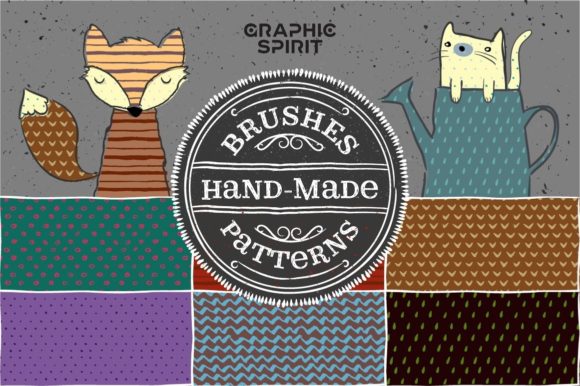
The core value of any brush pack lies in its versatility. Hand Made Brushes Patterns is structured to cover multiple aspects of vector design, ranging from stroke manipulation to background texturing. The inclusion of 37 art brushes provides the foundational tools for sketching, inking, and adding expressive details. These are typically pressure-sensitive or width-variable strokes that mimic the behavior of charcoal, ink pens, or dry media.
Beyond individual strokes, the 14 pattern brushes serve a different function. Pattern brushes in Illustrator are essential for creating borders, frames, ribbons, and complex repeating edges that follow a path. Having pre-made options here saves significant time, as constructing a seamless pattern brush manually requires precise alignment of corner and side tiles—a process that can be technically frustrating for intermediate users.
The package also extends into surface design with 7 square patterns and 67 colorful seamless patterns. These are distinct from the brushes; they are fillable swatches used for backgrounds, packaging design, or textile mockups. The addition of a grunge dust vector texture as a bonus item addresses a common pain point in vector art: the "too clean" look. Overlaying subtle noise or dust can unify a composition and add depth, making the final output feel less sterile.
Custom Creation vs. Pre-Made Libraries
A primary decision factor for many designers is whether to build their own brush libraries or purchase pre-made sets like Hand Made Brushes Patterns. Creating custom brushes offers total control over every anchor point and pressure curve. However, it is time-intensive. To create a single high-quality art brush that behaves naturally, a designer must test, refine, and adjust settings repeatedly.
For professionals working under tight deadlines, the tradeoff often favors pre-made solutions. This library allows users to bypass the technical setup phase and move directly into creation. The distinction here is not about quality—custom brushes can be superior if tailored perfectly—but about efficiency. If you need a consistent hand-drawn aesthetic across multiple projects, starting with a robust base set and tweaking it slightly is often more practical than building from zero.
However, relying solely on pre-made assets carries a risk of generic output. If thousands of designers use the exact same 37 art brushes without modification, portfolios can begin to look similar. The savvy user treats Hand Made Brushes Patterns as a starting point, adjusting opacity, blending modes, or stroke weights to create a unique signature style.
Integration with Different Design Styles
The utility of this collection varies significantly depending on the designer’s niche. For illustrators focusing on editorial or children’s book illustrations, the art brushes are likely the most valuable component. The organic variation in line weight helps convey movement and emotion, which rigid geometric lines cannot achieve.
Conversely, for brand identity designers, the pattern brushes and seamless patterns may hold greater weight. Branding often requires cohesive visual systems where patterns are applied to business cards, social media templates, or packaging. The 67 colorful seamless patterns provide a quick way to generate brand-consistent backgrounds. The key consideration here is color customization. Since these are vector-based, recoloring them to match a client’s palette is straightforward, making them highly adaptable for corporate or commercial work.
Web and UI designers might find limited direct application for the art brushes, as vector strokes do not always translate cleanly to code-friendly SVGs without bloating file sizes. However, the square patterns and textures can be exported as lightweight assets for web backgrounds, adding tactile depth to flat digital interfaces.
Technical Considerations and Limitations
While Hand Made Brushes Patterns offers a broad range of assets, it is important to understand the limitations of vector-based texture. Unlike raster brushes in Photoshop or Procreate, which rely on pixel density and complex blending, Illustrator brushes are mathematical paths. This means they scale infinitely without losing quality, but they can sometimes lack the subtle granular noise of real media.
The included grunge dust texture helps mitigate this, but users should be aware that achieving a truly painterly look in Illustrator often requires layering multiple brushes and transparency masks. This pack provides the ingredients, but the "cooking" still requires skill. Users expecting a one-click solution to replicate oil painting may be disappointed; this toolset is best suited for line art, graphic textures, and stylized vector illustrations.
Another factor is software compatibility. As stated, this is for Adobe Illustrator CC. Users on older versions or alternative vector software like Affinity Designer or CorelDRAW may face compatibility issues. Brush formats are not universally standardized, so ensuring your software version supports the latest brush definitions is crucial before purchasing.
When This Collection Is the Right Choice
Investing in Hand Made Brushes Patterns makes the most sense for designers who:
- Need to speed up their workflow: You have the skills to draw but want to skip the technical setup of brush creation.
- Work in mixed media styles: You frequently combine vector graphics with textured elements and need a cohesive library to maintain consistency.
- Are expanding their service offerings: If you primarily do logo design but want to offer illustration services, this pack lowers the barrier to entry by providing professional-grade tools immediately.
- Value versatility: The combination of brushes, patterns, and textures means you are buying a multi-purpose toolkit rather than a single-use asset.
When to Look for Alternatives
There are scenarios where this pack may not be the optimal solution. If your work is strictly geometric or minimalist, the hand-drawn aesthetic may be irrelevant. In such cases, investing in precision grid systems or typographic tools would yield a higher return on investment.
Additionally, if you are a purist who prefers raster-based painting, sticking to Photoshop or Clip Studio Paint brushes will provide a more natural media experience. Vector brushes simulate the look of hand-drawn lines, but they do not replicate the physical interaction of paint on canvas. For hyper-realistic digital painting, raster tools remain superior.
Finally, consider your current library. If you already own several high-end brush packs, assess the overlap. Many brush creators use similar source materials. If you already have 50+ art brushes, adding 37 more may offer diminishing returns unless the specific style of Hand Made Brushes Patterns fills a gap in your existing collection.
Making an Informed Decision
Choosing the right design resources is about matching tools to intent. Hand Made Brushes Patterns represents a solid mid-range option for Illustrator users seeking to add organic character to their vector work. It balances quantity with variety, offering enough diversity to handle everything from sketching to pattern design.
The decision ultimately hinges on your workflow preferences. If you value the scalability of vectors and the speed of pre-made assets, this collection is a pragmatic addition to your toolkit. However, if you prioritize absolute uniqueness or work primarily in raster environments, you may need to look elsewhere. By understanding what is included and how it compares to custom creation, you can determine if this bundle aligns with your creative goals and technical requirements.